


This article provides information about new features and improvements introduced in Retail 360 25.1 released on October 23, 2024. It also includes the updates from October 29 and November 5, 2024.
In addition to features listed below, the release also includes a number of stability improvements and fixes which do not extend the product functionality or change the user experience.
New features and improvements
- Price book audit
- Price book change history and rollback
- Wholesaler vendors
- Credit card batches
- Security improvements
- Write-off photos
- Extended VIN length
- Manufacturer Multi Pack promotions on Gilbarco Passport
Price book audit
|
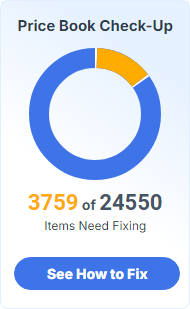
New feature. Added a home page widget and an aggregated report for auditing price book. Retail 360 provides a tool that monitors the current state of your price book and identifies areas for improvement. The aggregated information is displayed in the Price Book Check-Up widget on the Retail 360 home page and on the Price Book Manager dashboard.
The Price Book Check-Up is being rolled out gradually, so the widget may not be available in your account right away. We appreciate your patience as we deploy this update across all accounts. Once the feature is activated for you, the widget will appear in your dashboard. The widget opens Your Price Book Audit Results report, providing aggregated insights on key findings.
Read Price book audit article for details. |

Price book change history and rollback
|
New feature. Added the ability to review price book updates and roll back the changes. Retail 360 enables you to track every update to your price book with a detailed history log, allowing you to easily review changes and swiftly roll them back with just a few clicks. This feature provides complete control over pricing decisions and ensures you can quickly correct any errors, giving you greater confidence in managing your pricing strategy. To access the price book change history, click the history icon which appears on Price Book pages, such as Dashboard, Departments, Items and the like.
You can quickly revert 10 most recent changes made to the price book by clicking the history
Alternatively, you can review the detailed change log in the Price Book Changes History report to make an informed decision regarding the rollback.
Refer to Price book change history and rollback documentation section for details. |

 icon in the top-right corner of the toolbar and selecting the specific price book update from the Recent Price Book Changes sidebar:

Wholesaler vendors
|
New feature. Added the ability to designate a location as a wholesaler or warehouse. Retail 360 allows for building internal supply chain management, where one or more locations designated as warehouses / wholesalers deliver goods to other locations on the same account that function as retail stores. You can now configure a wholesaler vendor associated with your account's location.
Wholesaler locations can issue customer invoices that reflect the cost of inventory transfers to retailer locations, ensuring accurate internal billing, record-keeping, and product tracking. These invoices are transmitted via EDI (Electronic Data Interchange), enabling efficient and standardized communication. Read Setting up wholesalers article for details. |

Credit card batches
|
Enhancement. Improved the automatic retrieval of credit card batches from Verifone cash registers. Credit card batches are now correctly pulled from Verifone cash registers when Use CR Credit Card Batches option in the advanced cash register settings is set to Allow Manual Entry and Processing from Connected CR. For cash registers that do not support automatic batch retrieval, you can manually enter the credit card batches in the Cash Reconciliation Daily Data. For more information, refer to the Manually Entering Credit Card Batches section in the Daily Data article. |
Security improvements
|
Enhancement. Strengthened input validation and output encoding to protect against potential attacks. We have enhanced the security of Retail 360 by implementing stronger safeguards to prevent malicious scripts from being injected into our web application. These improvements ensure your data is protected from potential attacks that could exploit browser vulnerabilities to perform unauthorized actions. |
Write-off photos
|
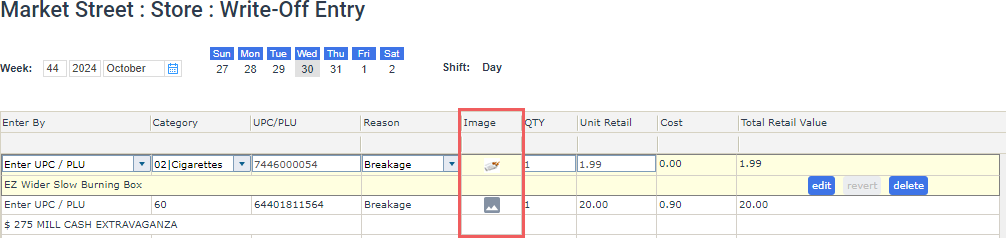
Enhancement. Enabled preview of photographic proof for write-off records. The Write-Off Entry form now includes a new Image field which presents a proof of the write-off, such as a photo of a broken bottle, label with food expiration date, and similar cases.
For optimal performance, thumbnails are loaded in batches after the Write-Off Entry form page loads. If a thumbnail does not appear immediately, please allow a few seconds for it to load. Clicking the thumbnail in that field opens a full-size image preview.
Currently, write-off images can only be added through the Retail 360 Mobile app. The Retail 360 online platform supports write-off image viewing but does not allow adding or updating photos on its own. |

Extended VIN length
|
Enhancement. Added support for longer VIN (Vendor Identification Number). Retail 360 now supports entering VINs (Vendor Identification Numbers) up to 20 characters in length. For more information, read the following articles:
To add or update the item's VIN, make sure the Allow to edit Item’s Vendor Information permission is granted to your user. |
Manufacturer Multi Pack promotions on Gilbarco Passport
|
Enhancement. Added support for Manufacturer Multi Pack (Mix&Match Amount) promotions on Gilbarco Passport cash registers. CStoreOffice® now supports Manufacturer Multi Pack (Mix&Match Amount) promotions on Gilbarco Passport cash registers. Manufacturer Multi-Pack promotions on Gilbarco Passport registers only apply to quantities that match the pack’s specified promotional units. Any additional units will be sold at regular price. |


