


In this section, the following information about the Cash Reconciliation report's data is presented:
- Prerequisites
- Cash Reconciliation in CStoreOffice®
- Data Mapping
- Cash Reconciliation Data Export via the Business Documents API
Prerequisites
This information becomes accessible through the Business Documents API after shifts are accepted in CStoreOffice® using any of the following methods:
- Automatic shifts acceptance
- Manual shift acceptance
- Undoing accepted shifts (remove document)
- The day is completed in CStoreOffice® Cash Reconciliation daily data.
Cash Reconciliation in CStoreOffice®
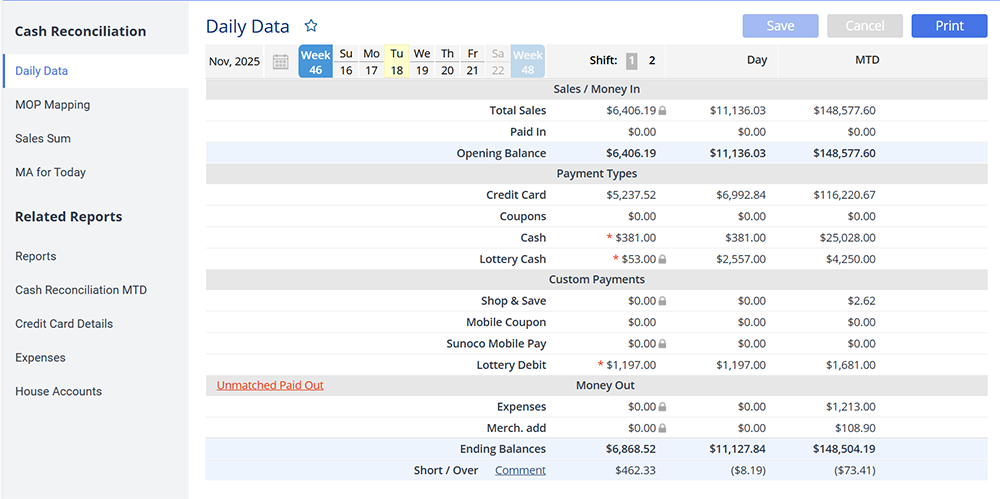
Cash Reconciliation data is generated from the following shift-related forms:
- Shift Totals / Shift Header: General shift information (date, NRGT, total sales, number of transactions, etc.).
- Cash Reconciliation: Opening balance, closing balance, safe drops, safe loans, and related cash movements.
- Shift Summaries by Events and MOPs: Totals grouped by methods of payment.
- Shift Miscellaneous Summaries (Shorts, Refunds, Voids): Amounts of voids, refunds, corrections, and miscellaneous transactions.
These forms can be accessed from the main CStoreOffice® interface under the selected location's shift report:
- Select the shift.
- Under Data Entry, select Cash Reconciliation / Cash Register.
Data Mapping
Cash Reconciliation data is converted into NAXML-MovementReport/MiscellaneousSummaryMovement NAXML structure:
Report Header
| Path | Description |
|---|---|
| TransmissionHeader/StoreLocationID | Store ID in CStoreOffice®. |
| TransmissionHeader/VendorName | Employee who accepted the shift or performed the reconciliation. |
| TransmissionHeader/VendorModelVersion | XML format version (for example, NAXML3.4.5). |
| MovementHeader/ReportSequenceNumber | Shift ID. |
| MovementHeader/BusinessDate | Shift date. |
| MovementHeader/BeginDate, BeginTime | Shift start date and time. |
| MovementHeader/EndDate, EndTime | Shift end date and time. |
| MovementHeader/Extension/RecordAction/@type | Operation type (for example, update). |
Cash Reconciliation Detail Blocks
All reconciliation metrics are delivered within repeated MiscellaneousSummaryMovement/MSMDetail blocks. Each block contains the following details:
- Codes describing the metric
- Amount and count (where applicable)
Balances and Summary Totals
| Code | Description |
|---|---|
| openingBalance | Opening cash balance at shift start. |
| closingBalance | Closing cash balance at shift end. |
| summaryTotals / sales | Total sales for the shift. |
| summaryTotals / overShort | Short/Over (cash discrepancy). |
Cash Movements (Safe & Drawer)
| Code | Description |
|---|---|
| payins / total | Total paid-in amount. |
| safeDrop / total | Safe drop totals. |
| safeLoan / total | Safe loan totals. |
Operational Statistics
| Code | Description |
|---|---|
| statistics / noSales | Number of No-Sale events. |
| statistics / transactions | Total number of transactions. |
| statistics / voidTransactions | Void transaction totals. |
| statistics / correction | Corrections. |
Refunds
| Code | Description |
|---|---|
| refunds / total | Total refunds for the shift. |
NRGT / Grand Totals
| Code | Description |
|---|---|
| totalizers / endingGrand | NRGT / Ending Grand Total from POS. |
Totals by Method of Payment (MOP)
This information is provided in sales / MOP / <modifier> element. It may contain, but not limited to, the following values:
- Cash
- Credit Card
- Debit
- Coupons
- FS (Food Stamps)
- Lottery Cash
- ATM
- Fuel Loyalty
- Credit / Debit generic MOP types
Amounts are delivered in MiscellaneousSummaryAmount, and counts in MiscellaneousSummaryCount.
House Account
| Code | Description |
|---|---|
| methodOfPaymentTotals / houseAccount | House Account totals. |
 XML Example with Cash Reconciliation Data
<pcats:NAXML-MovementReport version="">
   <pcats:TransmissionHeader>
    <pcats:StoreLocationID>32042</pcats:StoreLocationID>
    <pcats:VendorName>Magid Bugazia</pcats:VendorName>
    <pcats:VendorModelVersion>NAXML3.4.5</pcats:VendorModelVersion>
   </pcats:TransmissionHeader>
   <pcats:MiscellaneousSummaryMovement>
    <pcats:MovementHeader>
     <pcats:ReportSequenceNumber>1</pcats:ReportSequenceNumber>
     <pcats:PrimaryReportPeriod>4539761</pcats:PrimaryReportPeriod>
     <pcats:SecondaryReportPeriod>0</pcats:SecondaryReportPeriod>
     <pcats:BusinessDate>2025-11-14</pcats:BusinessDate>
     <pcats:BeginDate>2025-11-13</pcats:BeginDate>
     <pcats:BeginTime>21:57:00</pcats:BeginTime>
     <pcats:EndDate>2025-11-14</pcats:EndDate>
     <pcats:EndTime>21:52:11</pcats:EndTime>
     <pcats:Extension>
      <pcats:RecordAction type="update"/>
     </pcats:Extension>
    </pcats:MovementHeader>
    <pcats:MSMDetail>
     <pcats:MiscellaneousSummaryCodes>
      <pcats:MiscellaneousSummaryCode>summaryTotals</pcats:MiscellaneousSummaryCode>
      <pcats:MiscellaneousSummarySubCode>sales</pcats:MiscellaneousSummarySubCode>
     </pcats:MiscellaneousSummaryCodes>
     <pcats:MSMSalesTotals>
      <pcats:MiscellaneousSummaryAmount>11708.45</pcats:MiscellaneousSummaryAmount>
      <pcats:MiscellaneousSummaryCount>0</pcats:MiscellaneousSummaryCount>
     </pcats:MSMSalesTotals>
    </pcats:MSMDetail>
    <pcats:MSMDetail>
     <pcats:MiscellaneousSummaryCodes>
      <pcats:MiscellaneousSummaryCode>openingBalance</pcats:MiscellaneousSummaryCode>
     </pcats:MiscellaneousSummaryCodes>
     <pcats:MSMSalesTotals>
      <pcats:MiscellaneousSummaryAmount>11708.45</pcats:MiscellaneousSummaryAmount>
      <pcats:MiscellaneousSummaryCount>0</pcats:MiscellaneousSummaryCount>
     </pcats:MSMSalesTotals>
    </pcats:MSMDetail>
    <pcats:MSMDetail>
     <pcats:MiscellaneousSummaryCodes>
      <pcats:MiscellaneousSummaryCode>closingBalance</pcats:MiscellaneousSummaryCode>
     </pcats:MiscellaneousSummaryCodes>
     <pcats:MSMSalesTotals>
      <pcats:MiscellaneousSummaryAmount>11699.63</pcats:MiscellaneousSummaryAmount>
      <pcats:MiscellaneousSummaryCount>0</pcats:MiscellaneousSummaryCount>
     </pcats:MSMSalesTotals>
    </pcats:MSMDetail>
    <pcats:MSMDetail>
     <pcats:MiscellaneousSummaryCodes>
      <pcats:MiscellaneousSummaryCode>payins</pcats:MiscellaneousSummaryCode>
      <pcats:MiscellaneousSummarySubCode>total</pcats:MiscellaneousSummarySubCode>
     </pcats:MiscellaneousSummaryCodes>
     <pcats:MSMSalesTotals>
      <pcats:MiscellaneousSummaryAmount>0</pcats:MiscellaneousSummaryAmount>
      <pcats:MiscellaneousSummaryCount>0</pcats:MiscellaneousSummaryCount>
     </pcats:MSMSalesTotals>
    </pcats:MSMDetail>
    <pcats:MSMDetail>
     <pcats:MiscellaneousSummaryCodes>
      <pcats:MiscellaneousSummaryCode>summaryTotals</pcats:MiscellaneousSummaryCode>
      <pcats:MiscellaneousSummarySubCode>overShort</pcats:MiscellaneousSummarySubCode>
     </pcats:MiscellaneousSummaryCodes>
     <pcats:MSMSalesTotals>
      <pcats:MiscellaneousSummaryAmount>8.82</pcats:MiscellaneousSummaryAmount>
      <pcats:MiscellaneousSummaryCount>0</pcats:MiscellaneousSummaryCount>
     </pcats:MSMSalesTotals>
    </pcats:MSMDetail>
    <pcats:MSMDetail>
     <pcats:MiscellaneousSummaryCodes>
      <pcats:MiscellaneousSummaryCode>totalizers</pcats:MiscellaneousSummaryCode>
      <pcats:MiscellaneousSummarySubCode>endingGrand</pcats:MiscellaneousSummarySubCode>
     </pcats:MiscellaneousSummaryCodes>
     <pcats:MSMSalesTotals>
      <pcats:MiscellaneousSummaryAmount>3837343.15</pcats:MiscellaneousSummaryAmount>
      <pcats:MiscellaneousSummaryCount>0</pcats:MiscellaneousSummaryCount>
     </pcats:MSMSalesTotals>
    </pcats:MSMDetail>
    <pcats:MSMDetail>
     <pcats:MiscellaneousSummaryCodes>
      <pcats:MiscellaneousSummaryCode>refunds</pcats:MiscellaneousSummaryCode>
      <pcats:MiscellaneousSummarySubCode>total</pcats:MiscellaneousSummarySubCode>
     </pcats:MiscellaneousSummaryCodes>
     <pcats:MSMSalesTotals>
      <pcats:MiscellaneousSummaryAmount>0</pcats:MiscellaneousSummaryAmount>
      <pcats:MiscellaneousSummaryCount>0</pcats:MiscellaneousSummaryCount>
     </pcats:MSMSalesTotals>
    </pcats:MSMDetail>
    <pcats:MSMDetail>
     <pcats:MiscellaneousSummaryCodes>
      <pcats:MiscellaneousSummaryCode>statistics</pcats:MiscellaneousSummaryCode>
      <pcats:MiscellaneousSummarySubCode>noSales</pcats:MiscellaneousSummarySubCode>
     </pcats:MiscellaneousSummaryCodes>
     <pcats:MSMSalesTotals>
      <pcats:MiscellaneousSummaryAmount>0</pcats:MiscellaneousSummaryAmount>
      <pcats:MiscellaneousSummaryCount>3</pcats:MiscellaneousSummaryCount>
     </pcats:MSMSalesTotals>
    </pcats:MSMDetail>
    <pcats:MSMDetail>
     <pcats:MiscellaneousSummaryCodes>
      <pcats:MiscellaneousSummaryCode>statistics</pcats:MiscellaneousSummaryCode>
      <pcats:MiscellaneousSummarySubCode>transactions</pcats:MiscellaneousSummarySubCode>
     </pcats:MiscellaneousSummaryCodes>
     <pcats:MSMSalesTotals>
      <pcats:MiscellaneousSummaryAmount>0</pcats:MiscellaneousSummaryAmount>
      <pcats:MiscellaneousSummaryCount>486</pcats:MiscellaneousSummaryCount>
     </pcats:MSMSalesTotals>
    </pcats:MSMDetail>
    <pcats:MSMDetail>
     <pcats:MiscellaneousSummaryCodes>
      <pcats:MiscellaneousSummaryCode>statistics</pcats:MiscellaneousSummaryCode>
      <pcats:MiscellaneousSummarySubCode>voidTransactions</pcats:MiscellaneousSummarySubCode>
     </pcats:MiscellaneousSummaryCodes>
     <pcats:MSMSalesTotals>
      <pcats:MiscellaneousSummaryAmount>50.05</pcats:MiscellaneousSummaryAmount>
      <pcats:MiscellaneousSummaryCount>4</pcats:MiscellaneousSummaryCount>
     </pcats:MSMSalesTotals>
    </pcats:MSMDetail>
    <pcats:MSMDetail>
     <pcats:MiscellaneousSummaryCodes>
      <pcats:MiscellaneousSummaryCode>statistics</pcats:MiscellaneousSummaryCode>
      <pcats:MiscellaneousSummarySubCode>correction</pcats:MiscellaneousSummarySubCode>
     </pcats:MiscellaneousSummaryCodes>
     <pcats:MSMSalesTotals>
      <pcats:MiscellaneousSummaryAmount>99.54</pcats:MiscellaneousSummaryAmount>
      <pcats:MiscellaneousSummaryCount>8</pcats:MiscellaneousSummaryCount>
     </pcats:MSMSalesTotals>
    </pcats:MSMDetail>
    <pcats:MSMDetail>
     <pcats:MiscellaneousSummaryCodes>
      <pcats:MiscellaneousSummaryCode>safeDrop</pcats:MiscellaneousSummaryCode>
      <pcats:MiscellaneousSummarySubCode>total</pcats:MiscellaneousSummarySubCode>
     </pcats:MiscellaneousSummaryCodes>
     <pcats:MSMSalesTotals>
      <pcats:MiscellaneousSummaryAmount>0</pcats:MiscellaneousSummaryAmount>
      <pcats:MiscellaneousSummaryCount>0</pcats:MiscellaneousSummaryCount>
     </pcats:MSMSalesTotals>
    </pcats:MSMDetail>
    <pcats:MSMDetail>
     <pcats:MiscellaneousSummaryCodes>
      <pcats:MiscellaneousSummaryCode>safeLoan</pcats:MiscellaneousSummaryCode>
      <pcats:MiscellaneousSummarySubCode>total</pcats:MiscellaneousSummarySubCode>
     </pcats:MiscellaneousSummaryCodes>
     <pcats:MSMSalesTotals>
      <pcats:MiscellaneousSummaryAmount>0</pcats:MiscellaneousSummaryAmount>
      <pcats:MiscellaneousSummaryCount>0</pcats:MiscellaneousSummaryCount>
     </pcats:MSMSalesTotals>
    </pcats:MSMDetail>
    <pcats:MSMDetail>
     <pcats:MiscellaneousSummaryCodes>
      <pcats:MiscellaneousSummaryCode>sales</pcats:MiscellaneousSummaryCode>
      <pcats:MiscellaneousSummarySubCode>MOP</pcats:MiscellaneousSummarySubCode>
      <pcats:MiscellaneousSummarySubCodeModifier>Cash</pcats:MiscellaneousSummarySubCodeModifier>
     </pcats:MiscellaneousSummaryCodes>
     <pcats:MSMSalesTotals>
      <pcats:MiscellaneousSummaryAmount>2675</pcats:MiscellaneousSummaryAmount>
      <pcats:MiscellaneousSummaryCount>0</pcats:MiscellaneousSummaryCount>
     </pcats:MSMSalesTotals>
    </pcats:MSMDetail>
    <pcats:MSMDetail>
     <pcats:MiscellaneousSummaryCodes>
      <pcats:MiscellaneousSummaryCode>sales</pcats:MiscellaneousSummaryCode>
      <pcats:MiscellaneousSummarySubCode>MOP</pcats:MiscellaneousSummarySubCode>
      <pcats:MiscellaneousSummarySubCodeModifier>FS</pcats:MiscellaneousSummarySubCodeModifier>
     </pcats:MiscellaneousSummaryCodes>
     <pcats:MSMSalesTotals>
      <pcats:MiscellaneousSummaryAmount>0</pcats:MiscellaneousSummaryAmount>
      <pcats:MiscellaneousSummaryCount>0</pcats:MiscellaneousSummaryCount>
     </pcats:MSMSalesTotals>
    </pcats:MSMDetail>
    <pcats:MSMDetail>
     <pcats:MiscellaneousSummaryCodes>
      <pcats:MiscellaneousSummaryCode>sales</pcats:MiscellaneousSummaryCode>
      <pcats:MiscellaneousSummarySubCode>MOP</pcats:MiscellaneousSummarySubCode>
      <pcats:MiscellaneousSummarySubCodeModifier>Credit Card</pcats:MiscellaneousSummarySubCodeModifier>
     </pcats:MiscellaneousSummaryCodes>
     <pcats:MSMSalesTotals>
      <pcats:MiscellaneousSummaryAmount>0</pcats:MiscellaneousSummaryAmount>
      <pcats:MiscellaneousSummaryCount>0</pcats:MiscellaneousSummaryCount>
     </pcats:MSMSalesTotals>
    </pcats:MSMDetail>
    <pcats:MSMDetail>
     <pcats:MiscellaneousSummaryCodes>
      <pcats:MiscellaneousSummaryCode>sales</pcats:MiscellaneousSummaryCode>
      <pcats:MiscellaneousSummarySubCode>MOP</pcats:MiscellaneousSummarySubCode>
      <pcats:MiscellaneousSummarySubCodeModifier>Other Card</pcats:MiscellaneousSummarySubCodeModifier>
     </pcats:MiscellaneousSummaryCodes>
     <pcats:MSMSalesTotals>
      <pcats:MiscellaneousSummaryAmount>0</pcats:MiscellaneousSummaryAmount>
      <pcats:MiscellaneousSummaryCount>0</pcats:MiscellaneousSummaryCount>
     </pcats:MSMSalesTotals>
    </pcats:MSMDetail>
    <pcats:MSMDetail>
     <pcats:MiscellaneousSummaryCodes>
      <pcats:MiscellaneousSummaryCode>sales</pcats:MiscellaneousSummaryCode>
      <pcats:MiscellaneousSummarySubCode>MOP</pcats:MiscellaneousSummarySubCode>
      <pcats:MiscellaneousSummarySubCodeModifier>COUPONS</pcats:MiscellaneousSummarySubCodeModifier>
     </pcats:MiscellaneousSummaryCodes>
     <pcats:MSMSalesTotals>
      <pcats:MiscellaneousSummaryAmount>0</pcats:MiscellaneousSummaryAmount>
      <pcats:MiscellaneousSummaryCount>0</pcats:MiscellaneousSummaryCount>
     </pcats:MSMSalesTotals>
    </pcats:MSMDetail>
    <pcats:MSMDetail>
     <pcats:MiscellaneousSummaryCodes>
      <pcats:MiscellaneousSummaryCode>sales</pcats:MiscellaneousSummaryCode>
      <pcats:MiscellaneousSummarySubCode>MOP</pcats:MiscellaneousSummarySubCode>
      <pcats:MiscellaneousSummarySubCodeModifier>No Pos</pcats:MiscellaneousSummarySubCodeModifier>
     </pcats:MiscellaneousSummaryCodes>
     <pcats:MSMSalesTotals>
      <pcats:MiscellaneousSummaryAmount>0</pcats:MiscellaneousSummaryAmount>
      <pcats:MiscellaneousSummaryCount>0</pcats:MiscellaneousSummaryCount>
     </pcats:MSMSalesTotals>
    </pcats:MSMDetail>
    <pcats:MSMDetail>
     <pcats:MiscellaneousSummaryCodes>
      <pcats:MiscellaneousSummaryCode>sales</pcats:MiscellaneousSummaryCode>
      <pcats:MiscellaneousSummarySubCode>MOP</pcats:MiscellaneousSummarySubCode>
      <pcats:MiscellaneousSummarySubCodeModifier>Lottery Cash</pcats:MiscellaneousSummarySubCodeModifier>
     </pcats:MiscellaneousSummaryCodes>
     <pcats:MSMSalesTotals>
      <pcats:MiscellaneousSummaryAmount>0</pcats:MiscellaneousSummaryAmount>
      <pcats:MiscellaneousSummaryCount>0</pcats:MiscellaneousSummaryCount>
     </pcats:MSMSalesTotals>
    </pcats:MSMDetail>
    <pcats:MSMDetail>
     <pcats:MiscellaneousSummaryCodes>
      <pcats:MiscellaneousSummaryCode>sales</pcats:MiscellaneousSummaryCode>
      <pcats:MiscellaneousSummarySubCode>MOP</pcats:MiscellaneousSummarySubCode>
      <pcats:MiscellaneousSummarySubCodeModifier>ATM</pcats:MiscellaneousSummarySubCodeModifier>
     </pcats:MiscellaneousSummaryCodes>
     <pcats:MSMSalesTotals>
      <pcats:MiscellaneousSummaryAmount>0</pcats:MiscellaneousSummaryAmount>
      <pcats:MiscellaneousSummaryCount>0</pcats:MiscellaneousSummaryCount>
     </pcats:MSMSalesTotals>
    </pcats:MSMDetail>
    <pcats:MSMDetail>
     <pcats:MiscellaneousSummaryCodes>
      <pcats:MiscellaneousSummaryCode>sales</pcats:MiscellaneousSummaryCode>
      <pcats:MiscellaneousSummarySubCode>MOP</pcats:MiscellaneousSummarySubCode>
      <pcats:MiscellaneousSummarySubCodeModifier>Fuel Loyalty</pcats:MiscellaneousSummarySubCodeModifier>
     </pcats:MiscellaneousSummaryCodes>
     <pcats:MSMSalesTotals>
      <pcats:MiscellaneousSummaryAmount>0</pcats:MiscellaneousSummaryAmount>
      <pcats:MiscellaneousSummaryCount>0</pcats:MiscellaneousSummaryCount>
     </pcats:MSMSalesTotals>
    </pcats:MSMDetail>
    <pcats:MSMDetail>
     <pcats:MiscellaneousSummaryCodes>
      <pcats:MiscellaneousSummaryCode>sales</pcats:MiscellaneousSummaryCode>
      <pcats:MiscellaneousSummarySubCode>MOP</pcats:MiscellaneousSummarySubCode>
      <pcats:MiscellaneousSummarySubCodeModifier>CREDIT</pcats:MiscellaneousSummarySubCodeModifier>
     </pcats:MiscellaneousSummaryCodes>
     <pcats:MSMSalesTotals>
      <pcats:MiscellaneousSummaryAmount>4488.56</pcats:MiscellaneousSummaryAmount>
      <pcats:MiscellaneousSummaryCount>141</pcats:MiscellaneousSummaryCount>
     </pcats:MSMSalesTotals>
    </pcats:MSMDetail>
    <pcats:MSMDetail>
     <pcats:MiscellaneousSummaryCodes>
      <pcats:MiscellaneousSummaryCode>sales</pcats:MiscellaneousSummaryCode>
      <pcats:MiscellaneousSummarySubCode>MOP</pcats:MiscellaneousSummarySubCode>
      <pcats:MiscellaneousSummarySubCodeModifier>DEBIT</pcats:MiscellaneousSummarySubCodeModifier>
     </pcats:MiscellaneousSummaryCodes>
     <pcats:MSMSalesTotals>
      <pcats:MiscellaneousSummaryAmount>4536.07</pcats:MiscellaneousSummaryAmount>
      <pcats:MiscellaneousSummaryCount>166</pcats:MiscellaneousSummaryCount>
     </pcats:MSMSalesTotals>
    </pcats:MSMDetail>
    <pcats:MSMDetail>
     <pcats:MiscellaneousSummaryCodes>
      <pcats:MiscellaneousSummaryCode>methodOfPaymentTotals</pcats:MiscellaneousSummaryCode>
      <pcats:MiscellaneousSummarySubCode>houseAccount</pcats:MiscellaneousSummarySubCode>
     </pcats:MiscellaneousSummaryCodes>
     <pcats:MSMSalesTotals>
      <pcats:MiscellaneousSummaryAmount>0</pcats:MiscellaneousSummaryAmount>
      <pcats:MiscellaneousSummaryCount>0</pcats:MiscellaneousSummaryCount>
     </pcats:MSMSalesTotals>
    </pcats:MSMDetail>
   </pcats:MiscellaneousSummaryMovement>
  </pcats:NAXML-MovementReport>
Cash Reconciliation Data Export via the Business Documents API
To export the XML files with the Cash Reconciliation report via the Business Documents API:
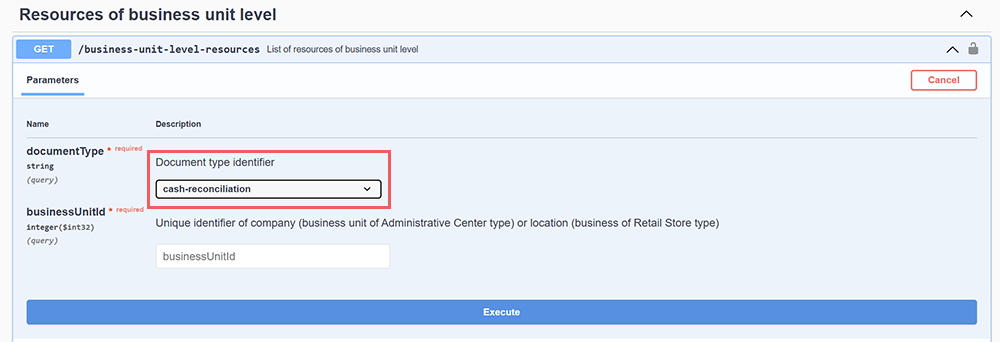
- Prepare the location / station identifier (businesUnitId) as the input data.
- Call the API from the
/business-unit-level-resourcesendpoint. - Use cash-reconciliation as the Document type identifier value.
For more information, see Calling the Business Documents API at the Business Unit Level.


