


The Notification Management interface enables you to send targeted digital communications directly to your customers. All notifications are delivered as push messages to the Go Loyalty mobile app and appear instantly on the user’s mobile device.
You can use this feature to promote regular products and services (fuel, food, etc.) or to send tobacco-related offers to age-verified customers (21+). Notifications help you keep users informed, drive engagement, and highlight time-sensitive promotions.
To maintain Altria Tier 3 compliance, you must send at least 3 digital communications per quarter.
Accessing notifications
- Sign in to the Go Loyalty portal.
- Navigate to the Notification Management section.
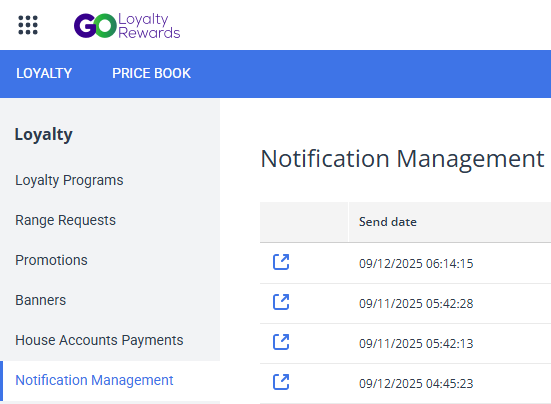
You will see a history of previously sent notifications, including the send date, message text, and audience size.
Sending a new notification
To send a new offer announcement to your customers, click the Add New button on top of notifications history table. Fill in the following notification parameters:
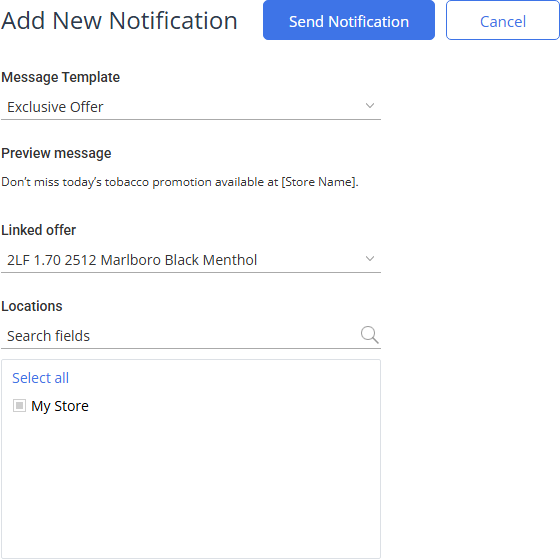
- Message Template: Choose a predefined message template from the dropdown menu. Once you select a template, you can preview the notification message. Placeholders in square brackets are automatically populated with calculated values.
- Linked Offer: Choose an active promotion from the list to link to this notification.
- Locations for which the promotion will be active.
You cannot type a custom message. Use an approved template to ensure compliance.
Altria tobacco product promotions are automatically created by integration module. To change such promotions, contact your Altria representative.
Click the Send Notification button at the top. Go Loyalty will queue the message and dispatch it to eligible customer's devices.
Notifications about tobacco offers will only be shown to age-verified customers (21+) in the United States who provided a valid government ID in the Go Loyalty mobile app.
Before sending, Go Loyalty calculates and displays the notification audience based on purchase history linked to the customer's Loyalty ID (mobile phone number) and a verified age. The notification will target loyal customers who shop at a specific physical location, identified by their historical association with a store through their purchase activity. Notifications are not bound to the customer's current GPS position.
Notifications history
the Notification Management section shows the full history of notifications sent to user mobile devices.

- Send date: The date and time when the notification has been sent.
- Message: Notification message text.
- Notification ID: Unique identifier of the notification.
- Offer ID:Unique identifier of the offer bound to the notification. Click the number to open the offer details.
- Audience: The total number of users who have received the notification.


