


The Promotions screen serves as a centralized hub for monitoring customer loyalty programs. This screen gives you a clear view into all centralized promotions managed at the back-office, keeping your store synced with the latest offers.
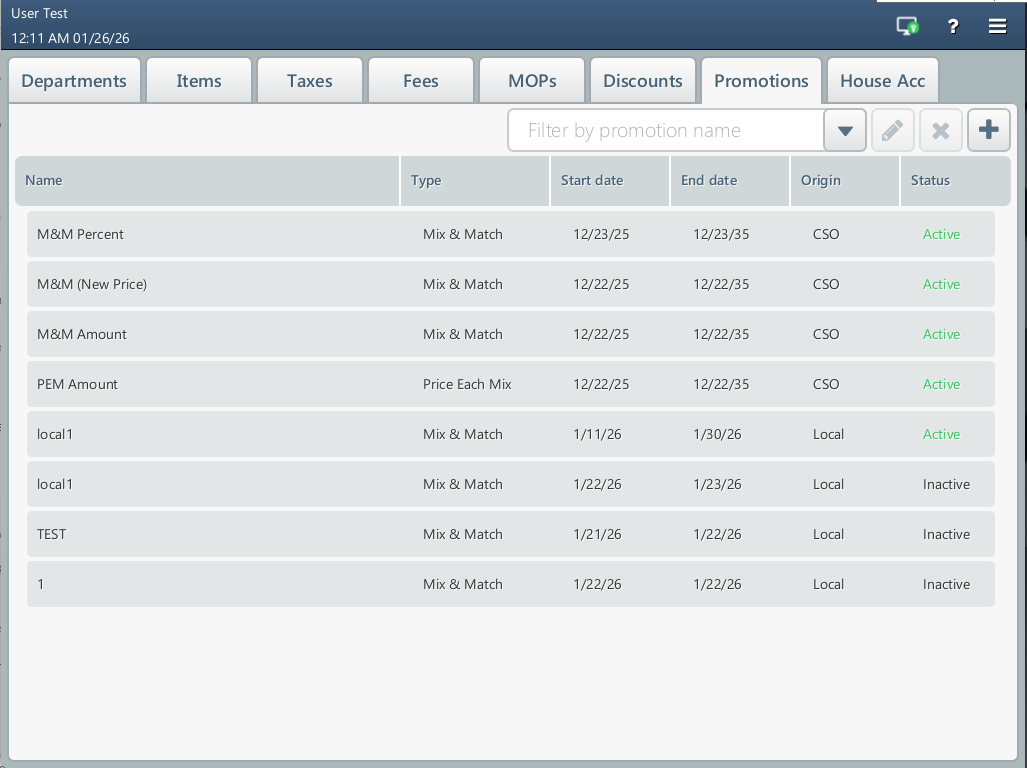
Beyond viewing global campaigns, you can manage local promotions directly on the POS. This allows you to bundle products and trigger instant discounts specifically to your store’s current inventory and goals:
- Create a promotion: Tap the plus button to create a local promotion. Currently, only Mix & Match promotions are supported.
- Change and disable promotions: Tap the pencil icon to edit a local promotion. To update a centralized promotion, use CStoreOffice®.
- Delete a promotion: Tap the delete icon to remove a local promotion. To delete a centralized promotion, use CStoreOffice®.
Promotions created locally are unique to this specific cash register. They do not synchronize with CStoreOffice® or other registers, allowing for localized control without affecting the wider network.


