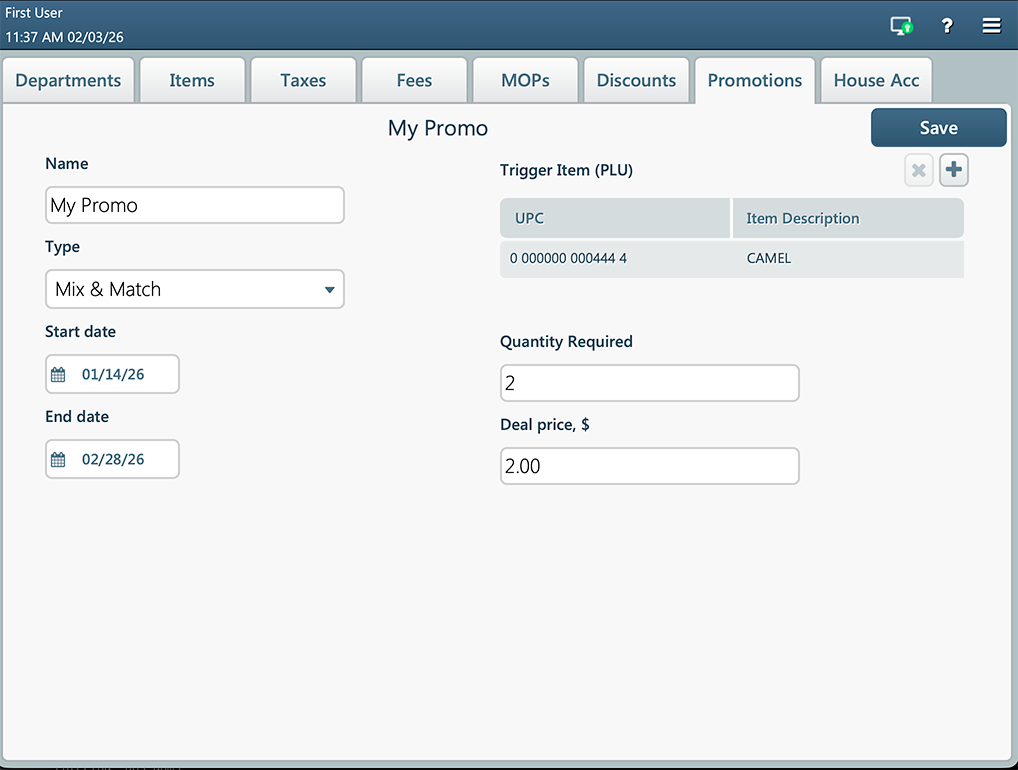
The Mix & Match promotion gives customers a discount when they buy a specific number of items from the predefined list in a single purchase. The promoted items are generally of the same product or product family. For example, the Mix & Match promotion can be used for the following campaigns:
- Buy any three drinks and get a 20% discount.
- Buy 5 candies at $5.00.
- Save $1 off any two packs of cigarettes.
To create a new promotion, on the Promotions tab, press the plus button, enter the following information, and then press Save:
- Name: A human-readable label used to identify and search for a promotion in the list.
- Type: Select "Mix & Match".
- Start and End dates: These fields allow SmartPOS to automatically toggle a promotion on or off without manual intervention.
- Trigger items: Add price book items to a promo group or remove an item from a group.
- Quantity required: The number of items that a customer must purchase for the discount to be applied.
- Deal price: The new price for the promoted items.