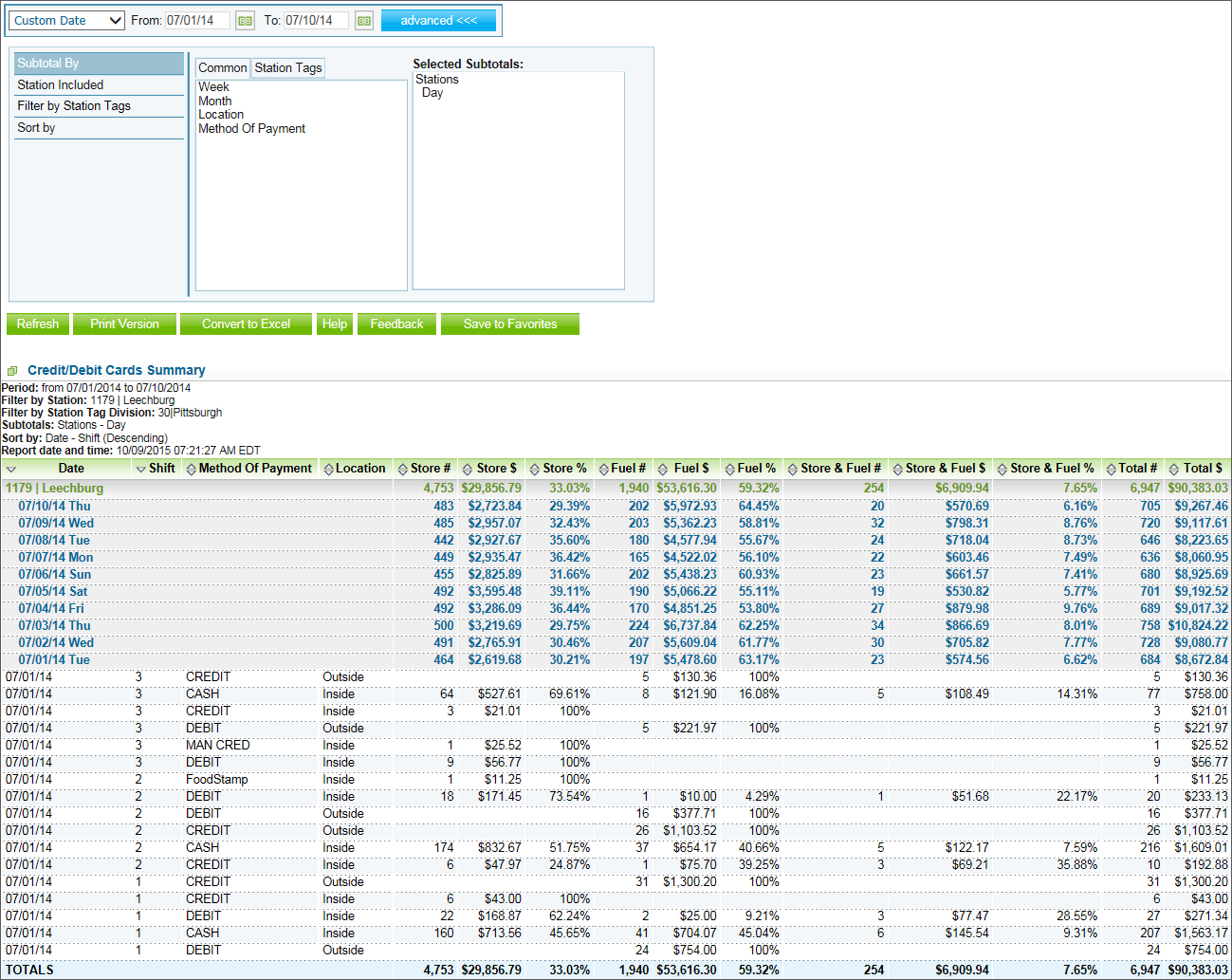
This section describes the specifics of accessing and interpreting the Credit/Debit Card Summary report.
You can find the report at Reports > Accounting > Credit/Debit Cards Summary. For more information, see Viewing Reports.
The Credit/Debit Card Summary report provides the information on the credit/debit card payments for the specified location and period of time.
The report contains the following information:
To get the exact information you need, you can apply filters to the report. To set up a filter, select one or more filtering options. Once the filter is set up, at the bottom of the filter section, click the Refresh button to display the report data by the filter criteria.
The report provides the following filtering and sorting options:
Press CTRL to select several items at a time.
For more information on additional report features, see Reports.
Last updated: Tuesday, November 6, 2018
Copyright © Petrosoft, LLC

Confidentiality level – Public use
Petrosoft, LLC
290 Bilmar Drive, Pittsburgh, PA 15205
Phone: 412-306-0640
Fax: 412-202-5487
 Feedback