


The Special Discount option defines whether an item or department is eligible for a manual or automatic "Special Discount" calculation. If enabled, items can be discounted when a Special Discount key is pressed or a specific discount rule is triggered. If disabled, the register will skip those items when calculating a discount, even if the cashier tries to apply one.
This setting only applies to Verifone cash registers.
To configure the Special Discount settings in CStoreOffice®:
- Enable/disable the Allow Direct Sales (Special Discount) setting at the department level. This setting will be automatically propagated to all child items for all stations.
- To override theSpecial Discount at the item level:
- Open the Item Setup form.
- Scroll down to the Special Discount tab and click it to open the settings.
- Switch whether you want to configure settings by locations or location tags:
- If the settings are applied by location, select/clear the Special Discount checkbox next to the corresponding station name.

- If the settings are applied by the selected location tag, select/clear the Special Discount checkbox next to the corresponding tag.
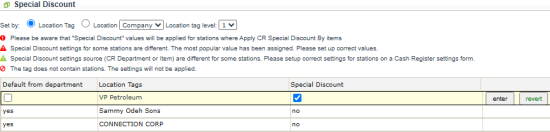
Special Discount values will only be applied to stations where Apply CR Special Discount equals to By items.
- To apply the setting, click the enter button next to it. To cancel the update, click the revert button.
- To inherit the department-level Allow Direct Sales (Special Discount) setting, select the Default from department checkbox and click the enter button.






