


The Fractional Quantity option defines whether the user (customer) can be eligible to sell fractional quantity of items from certain stations. The settings can be downloaded from the cash register, customized in CStoreOffice® and then sent back to the cash register.
This setting only applies to Verifone cash registers.
To configure the fractional quantity settings in CStoreOffice®:
- Enable/disable the fractional quantity setting (Allow Fractional Quantity) at the department level. This setting will be automatically propagated to all child items for all stations.
- To override the fractional quantity at the item level:
- Open the Item Setup form.
- Scroll down to the Fractional Qty Settings tab and click it to open the settings.
- Switch whether you want to configure settings by locations or location tags:
- If the settings are applied by location, select/clear the Fractional Qty checkbox next to the corresponding station name.

- If the settings are applied by the selected location tag, select/clear the Fractional Qty checkbox next to the corresponding tag.
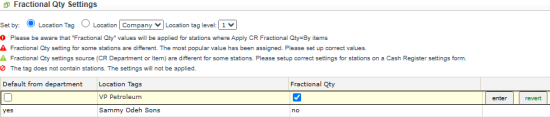
Fractional quantity values will only be applied to stations where Apply CR Fractional Qty equals to By items.
- To apply the setting, click the enter button next to it. To cancel the update, click the revert button.
- To inherit the department-level Allow Fractional Quantity setting, select the Default from department checkbox and click the enter button.






