


An item card includes a GPM Settings section located alongside standard retail pricing fields.
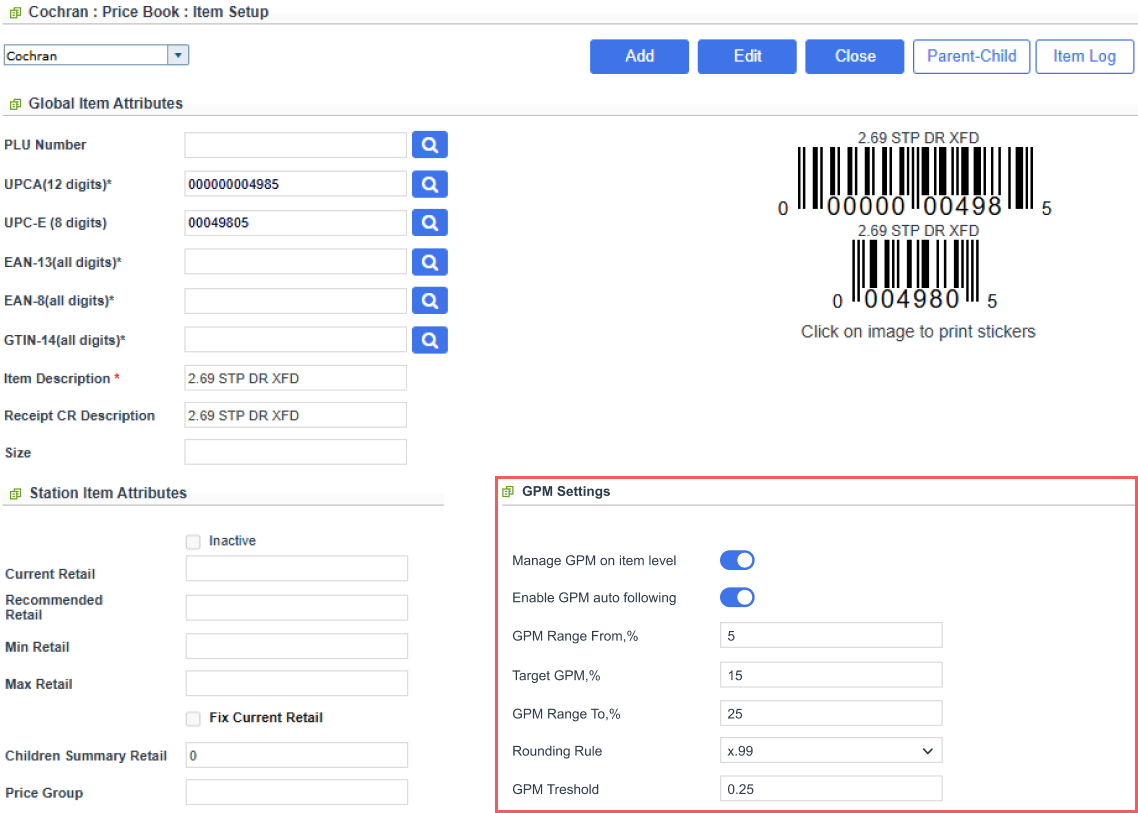
By default, the fields reflect the effective settings inherited from the item's category. These fields are disabled and only used as a reference. GPM Settings Source displays the origin of the active settings.
To customize rules for this specific item, select the Manage GPM on item level option and set custom values for:
- Enable Auto GPM Following: Activates automated retail calculations for items in the category.
- GPM Range Fromm %: The lowest GPM range value for the specified parameters.
- Target GPM, %: Defines the specific margin percentage used to calculate the proposed retail price.
- GPM Range To, %: The highest GPM value for the specified parameters.
- Rounding Rule: Applies customer-specific retail price endings, including fixed endings (x.99, x.49, x.50, x.55, x.09) and nearest-increment rounding (nearest 0.05 and nearest 0.10).
- GPM Threshold: Sets a percentage-point threshold (e.g., 0.25) to prevent price changes for minor or fractional cost fluctuations.
For details on how these settings work, refer to the Auto GPM Following article.
To remove an item override and return to category-level GPM settings, clear Manage GPM on item level.
Save the item to activate GPM overrides.


