


The Business Documents dashboard shows the availability status of business document APIs for the selected location. To open the dashboard, from the main CStoreOffice® page go to Reports > Dashboards and then click Business Documents in the left pane.
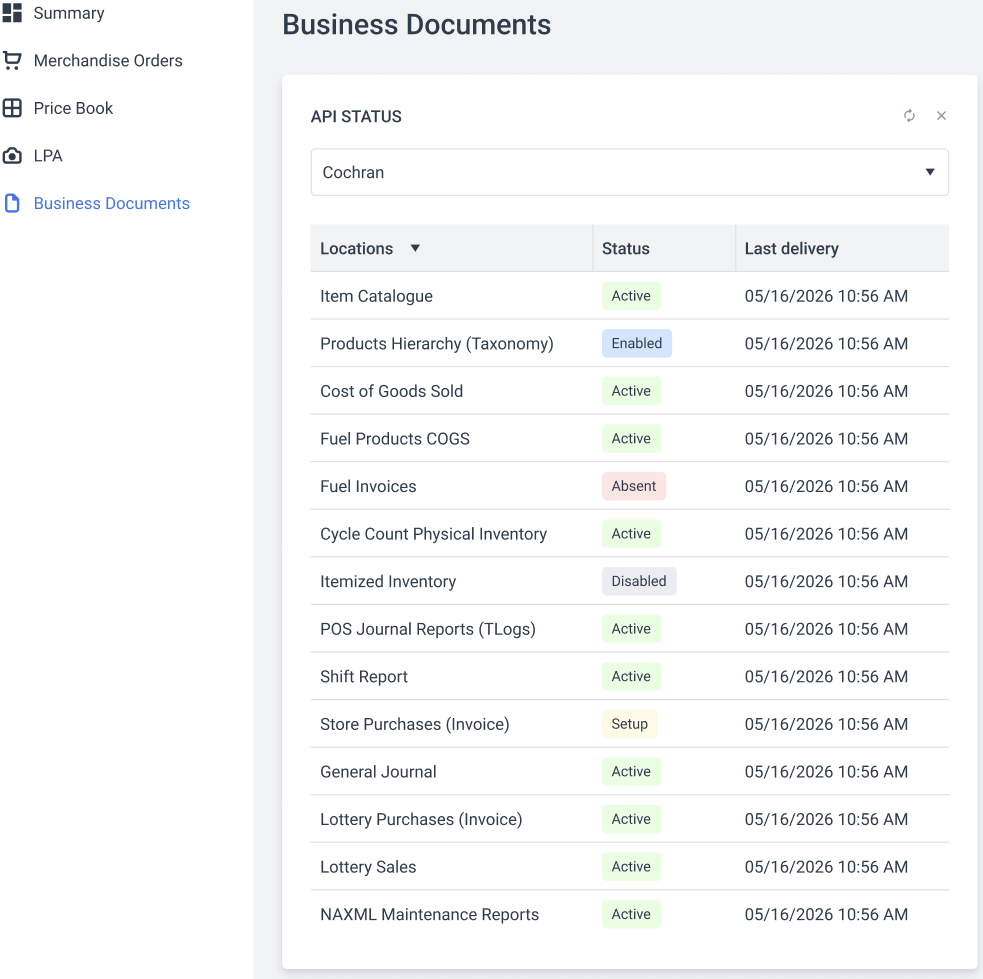
The Status column shows the presence and availability of the specific business document:
- Absent: You are not subscribed to this business document.
- Setup: The business document subscription setup is currently in progress. You cannot use this API until the process is finished (Ready).
- Ready: The business document subscription is set up and is available for use.
- Active: The business document is currently being delivered to your account. The Last Delivery column shows the date when the document was last downloaded.
- Disabled: The subscription for this specific business document was deactivated.
Refreshing Data
The subscription data is not refreshed automatically. To find the most recent status of your business document subscriptions, click the refresh icon at the top right of the API Status widget.



